Every renovation, retrofit, and as-built documentation project starts with the same problem: the drawings on file don't match what's actually there. Scan to BIM solves that problem — turning real-world physical measurements into an accurate, intelligent 3D model ready for design, coordination, and facility management.
What Is Scan to BIM?
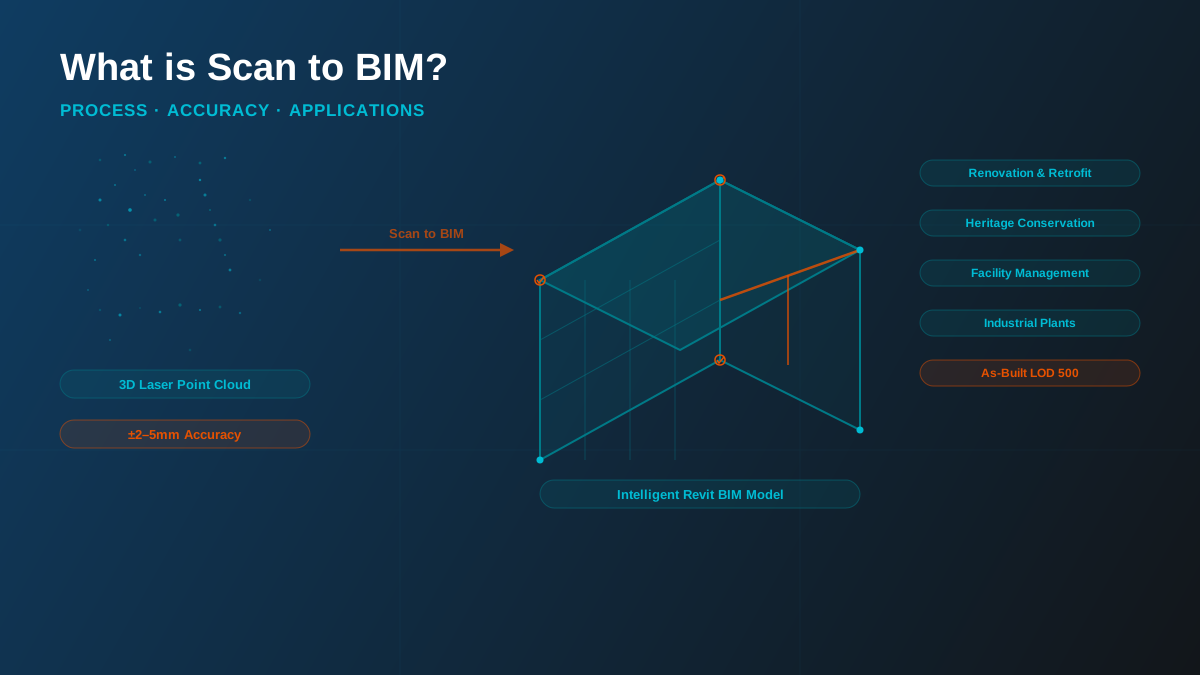
Scan to BIM (Building Information Modeling) is the process of converting 3D laser scan data — known as a point cloud — into an intelligent BIM model using software such as Autodesk Revit. The resulting model accurately represents existing building conditions and contains detailed information about architectural, structural, and MEP (Mechanical, Electrical, and Plumbing) elements.
Unlike traditional manual site measurements, Scan to BIM captures millions of precise data points in a short period, significantly improving accuracy, reducing rework, and accelerating project delivery. Where a manual survey might take a week and still miss hidden conditions, a laser scan captures the full geometry of a floor in hours — with sub-millimetre precision at the scanner itself.
Where it's used: Scan to BIM is widely applied in renovation, refurbishment, facility management, heritage conservation, industrial plants, hospitals, commercial buildings, airports, and infrastructure projects — anywhere that reliable as-built information is essential before design or construction begins.
How the Process Works
A Scan to BIM project follows a structured four-stage workflow from physical measurement to delivered model:
- Site scanning — A terrestrial laser scanner (typically a Leica BLK360, FARO Focus, or Trimble X7) is positioned at multiple set-up points across the building to eliminate line-of-sight gaps. Each set-up captures a full spherical scan of millions of points, with the scanner automatically registering colour and intensity data alongside geometry.
- Point cloud registration — Individual scans are stitched together into a single coordinated point cloud using software such as Autodesk ReCap Pro or FARO SCENE. Scan-to-scan registration is validated against control targets to ensure the combined cloud is spatially accurate across the whole site.
- BIM modeling — The registered point cloud is imported into Autodesk Revit as a reference underlay. BIM elements — walls, columns, beams, slabs, ductwork, pipework, cable trays, equipment — are modeled directly against the measured geometry, element by element, to the agreed Level of Development (LOD).
- Quality assurance against the cloud — The completed model is checked back against the source point cloud to confirm that all modeled elements sit within the agreed deviation tolerance. Any elements outside tolerance are corrected before delivery.
Technology: Scanners & Software
The quality of a Scan to BIM deliverable depends on the combination of scanning hardware, registration software, and modeling platform:
| Stage | Common Tools | Purpose |
|---|---|---|
| Site capture | Leica BLK360, FARO Focus 3D, Trimble X7 | Capturing millions of precise 3D points per scan position |
| Registration | Autodesk ReCap Pro, FARO SCENE, Cyclone | Stitching individual scans into a single coordinated point cloud |
| BIM modeling | Autodesk Revit | Creating intelligent BIM elements from the registered cloud |
| QA & delivery | Revit + ReCap, Navisworks | Deviation checking, clash detection, federated model review |
The point cloud format most widely used for Revit integration is the .RCP / .RCS format (Autodesk ReCap), though most scanners can also export to .E57 and .LAS for compatibility with other platforms.
Accuracy & Tolerances
Modern terrestrial laser scanners capture raw geometry to within ±2–5mm at typical scanning distances. However, the tolerance that matters most to a project is not the raw scanner accuracy — it is the agreed deviation between the point cloud and the modeled BIM elements that are traced from it.
This modeling tolerance is a deliberate project decision, not a default:
- Heritage and conservation work often requires tight tolerances of ±3–5mm, where exact geometry is critical for restoration or structural intervention work.
- MEP retrofit and coordination typically works to ±5–10mm, sufficient to identify clashes and interferences between existing services and new installations.
- Space planning and feasibility can work to ±10–20mm, where overall spatial relationships matter more than precise dimensional accuracy.
Best practice: tolerance should be agreed and written into scope before modeling begins — not discovered at delivery when the client finds that the duct has been modeled ±15mm off its actual centreline. We define tolerance per element category in the project BEP, and QA the finished model against it before handover.
Key Applications
Scan to BIM delivers its strongest return on projects where the cost of relying on inaccurate or missing existing information is high:
- Renovation and refurbishment — Existing buildings rarely match their original drawing sets after years of undocumented changes. Scan to BIM establishes a verified baseline before any new design work begins, eliminating the rework and change orders that come from design clashes with undocumented existing conditions.
- Heritage conservation — Historic structures may have no original drawings at all. Laser scanning captures exact geometry of facades, vaults, structural elements, and ornamental details that would be impossible to measure accurately by hand.
- As-built LOD 500 documentation — Reconciling a design model against what was actually constructed. The point cloud confirms as-built deviations and produces a field-verified LOD 500 model for facility management handover.
- Facility management — Owners and FM teams need an accurate baseline model to plan maintenance, retrofits, and space changes with any confidence. Scan to BIM provides that baseline in a fraction of the time of a manual survey.
- Industrial plants and MEP-dense retrofits — Existing pipe racks, ductwork, equipment, and structural steelwork are far faster to capture by scan than by manual field measurement, and the point cloud supports clash detection between existing and new installations.
- Hospitals and healthcare facilities — Complex MEP infrastructure and strict operational constraints make manual survey impractical. Scanning captures all services with minimal disruption to live clinical areas.
- Airports and transport infrastructure — Large, geometrically complex structures that are difficult and disruptive to measure conventionally benefit most from the speed and completeness of laser scanning.
Deliverables
A Scan to BIM project typically delivers:
- The registered point cloud (.RCP/.RCS or .E57) for use as a reference in any future modeling, design, or verification work.
- Discipline BIM models — architectural, structural, and/or MEP, built in Revit to the agreed LOD, ready for design development, clash detection, or FM integration.
- 2D drawing outputs — floor plans, elevations, sections, and reflected ceiling plans derived directly from the verified model.
- QA report — deviation analysis confirming modeled elements sit within the agreed tolerance against the source point cloud.
Scan to BIM vs. Manual Survey
| Factor | Manual Survey | Scan to BIM |
|---|---|---|
| Capture speed | Days to weeks per floor | Hours per floor |
| Data density | Spot measurements at key points | Millions of points covering all visible surfaces |
| Hidden conditions | Missed unless specifically flagged | Captured wherever line-of-sight exists |
| Dimensional accuracy | ±10–30mm depending on method | ±2–10mm depending on tolerance agreement |
| Site revisits | Common — missed measurements require return visits | Rare — point cloud reviewed in office after single site visit |
| Model quality | Dependent on survey notes and interpretation | Modeled directly against measured geometry |
Getting Started
A Scan to BIM project starts with agreeing scope per discipline, LOD, and tolerance — the same decisions that drive any BIM scope, just anchored to physical existing conditions rather than a design brief. For most projects, that means:
- Defining which disciplines are needed (arch only, or arch + structure + MEP)
- Agreeing LOD per element category (LOD 300 for space planning, LOD 400 for MEP retrofit coordination)
- Setting deviation tolerance per category
- Confirming scan format and software compatibility with the downstream design team
Our Scan to BIM service covers the full workflow from point cloud registration through modeled, QA'd deliverables — for renovation, as-built documentation, heritage, and industrial projects across the US, UK, UAE, and beyond. Get a free quote to discuss your existing-conditions project.